Overview of the Invitations Stored on This Device
Invitations Stored on This Device:
Info About Saved Invitations Hide Info
This tile lists all invitations stored locally on your device. If none are stored locally, sample images are displayed.
When are the invitations stored locally?
As soon as you sign in to your invitation, it will be stored locally on your device
(securely encrypted). If you checked the “Remember login credentials” box when signing
in, you’ll also see the corresponding title right here.
What happens when I click “Remove”?
This completely deletes this invitation from your device –
including saved passwords and any offline changes that haven’t synced yet. Your data on
our server remains completely unaffected.
How can I delete the invitation from the server?
You can do this very easily in the settings for the respective invitation.
Alternatively, this happens automatically as soon as the specified deletion date
is reached.
The Terms and Privacy Policy apply.
Key Features at a Glance
100% Free
No Costs, No Ads
Using CelebrationBase is completely free. No ads
are displayed.
In the future, CelebrationBase will be funded by commissions from
affiliate links associated with the gift wishes you specify in the wishlists. This
does not result in any additional costs for you or your guests, as these commissions are
already factored into the pricing by the stores.
Without Registration
No Account, No Email
To create an invitation, all you have to do is come up with a password and
remember it.
This will serve as your login in the future when you access the link to the invitation
you created.
Your guests don’t need to register either. You create an access code for
each guest that they can use to log in.
True End-to-End Encryption
Only You and Your Guests Have Access
CelebrationBase consistently relies on end-to-end encryption. All data (with the exception of the specified deletion date) in the invitation is encrypted right in the browser so that only you and your guests can decrypt it. CelebrationBase receives and stores only the data that is already encrypted. Since CelebrationBase does not have the key, the data from CelebrationBase cannot be decrypted and viewed, whether by accident, intentionally, or at the behest of a government.
Offline Mode
Available Anytime, Anywhere
Once you’ve opened an invitation in your browser, that invitation is
stored encrypted in your browser. This means you can view the invitation even
without an active Internet connection.
Editing
is also possible offline. As soon as you’ve opened the invitation and an
Internet connection is reestablished, the data is synchronized with the server so that
everyone can see the changes.
Modular Approach
Combine Design, Planning, and Wishlist Modules
Thanks to its modular approach, you can customize the invitation however you like. From a
simple wishlist to an invitation with headings, text, planning features, and
a wishlist function, anything is possible.
Look forward to even more in the future, as additional modules and features are
currently
under development :)
Design Modules
Be Creative
The following design modules are currently available:
- Heading: Heading to structure the invitation into sections
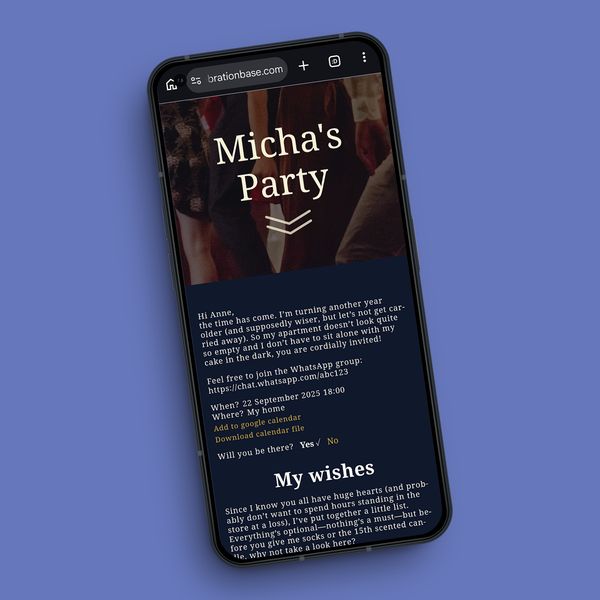
- Text: Free-form text for, e.g., introductory letters or explanatory notes. Automatically filled placeholders such as the guest’s name are supported, so that each guest sees their name in the welcome text.
Planning Modules
Coordinate Together
The following planning modules are currently available:
- When/Where: Specify the time and location. Calendar entries are automatically generated, which guests can import (as a file or via a direct link for Google Calendar)
- RSVP: Guests can indicate whether they will attend or not. You’ll see a table with all the poll results
Wishlist
Tell ’em What You Wish For
The following main features characterize the wishlist:
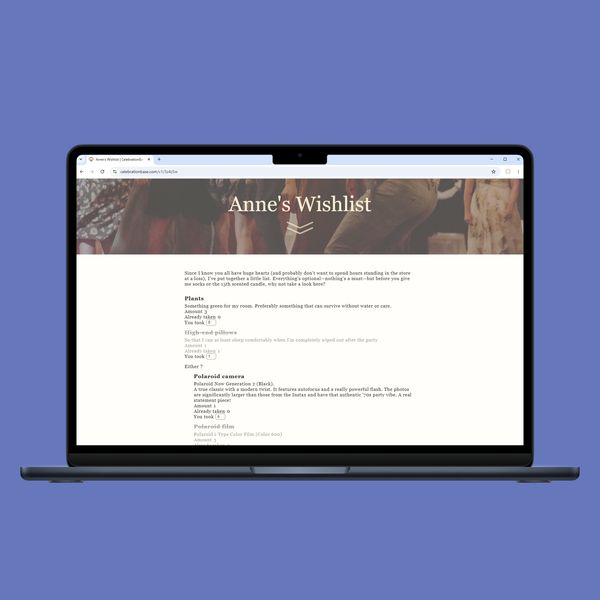
- Wishes: You can specify your wishes. Currently, you can enter a title, a description, and the quantity.
- Reservation feature: Guests can specify which gift requests they will fulfill for you. This automatically visually hides that request from the other guests. This way, you won’t receive duplicate gifts. Of course, you yourself won’t see any of the fulfilled gift requests.
- Dependencies: You can structure your wishes so that every guest can easily see which gifts are mutually exclusive. The reservation feature also takes these dependencies into account.